2023年6月 - 新的命令行接口、样式及更多
完整的 CLI 重写,具有新的样式、主题选项和更多功能。
我今天有很多更新要与你分享:
🌐 I have a lot of updates to share with you today:
- 新命令行工具 - 从零重写了命令行工具。你现在可以添加组件、依赖并配置导入路径。
- 主题 - 在使用 CSS 变量或 Tailwind CSS 工具类进行主题选择之间进行选择。
- 基础颜色 - 配置项目的基础颜色。这将用于生成组件的默认颜色调色板。
- React 服务器组件 - 选择不使用 React 服务器组件。CLI 将自动添加或移除
use client指令。 - 样式 - 介绍一个名为 Style 的新概念。一个样式拥有自己的一套组件、动画、图标等。
- 退出动画 - 为所有组件添加了退出动画。
- 其他更新 - 新的
icon按钮尺寸,更新的sheet组件等。 - 更新你的项目 - 如何更新你的项目以获取最新更改。
新 CLI
🌐 New CLI
在过去的几周里,我一直在开发一个新的命令行工具。这是一次完全的重写。它带来了许多新功能和改进。
🌐 I've been working on a new CLI for the past few weeks. It's a complete rewrite. It comes with a lot of new features and improvements.
init
当你运行 init 命令时,你将被询问一些问题来配置 components.json:
🌐 When you run the init command, you will be asked a few questions to configure components.json:
Which style would you like to use? › Default
Which color would you like to use as base color? › Slate
Where is your global CSS file? › › app/globals.css
Do you want to use CSS variables for colors? › no / yes
Where is your tailwind.config.js located? › tailwind.config.js
Configure the import alias for components: › @/components
Configure the import alias for utils: › @/lib/utils
Are you using React Server Components? › no / yes此文件包含关于你组件的所有信息:它们的安装位置、导入路径、样式等。
🌐 This file contains all the information about your components: where to install them, the import paths, how they are styled...etc.
你可以使用此文件更改组件的导入路径、设置 baseColor 或更改样式方法。
🌐 You can use this file to change the import path of a component, set a baseColor or change the styling method.
{
"style": "default",
"tailwind": {
"config": "tailwind.config.ts",
"css": "src/app/globals.css",
"baseColor": "zinc",
"cssVariables": true
},
"rsc": false,
"aliases": {
"utils": "~/lib/utils",
"components": "~/components"
}
}这意味着你现在可以在任何目录结构中使用 CLI,包括 src 和 app 目录。
🌐 This means you can now use the CLI with any directory structure including src and app directories.
add
add 命令现在功能更强大。你现在可以添加 UI 组件,同时也可以导入更复杂的组件(即将推出)。
🌐 The add command is now much more capable. You can now add UI components but also import more complex components (coming soon).
CLI 将自动解析所有组件和依赖,根据你的自定义配置格式化它们并将它们添加到你的项目中。
🌐 The CLI will automatically resolve all components and dependencies, format them based on your custom config and add them to your project.
diff(实验性)
🌐 diff (experimental)
我们还引入了一个新的 diff 命令,以帮助你跟踪上游更新。
🌐 We're also introducing a new diff command to help you keep track of upstream updates.
你可以使用此命令查看上游存储库中发生了哪些更改,并相应地更新你的项目。
🌐 You can use this command to see what has changed in the upstream repository and update your project accordingly.
运行 diff 命令以获取有可用更新的组件列表:
🌐 Run the diff command to get a list of components that have updates available:
The following components have updates available:
- button
- /path/to/my-app/components/ui/button.tsx
- toast
- /path/to/my-app/components/ui/use-toast.ts
- /path/to/my-app/components/ui/toaster.tsx然后运行 diff [component] 来查看更改:
🌐 Then run diff [component] to see the changes:
const alertVariants = cva(
- "relative w-full rounded-lg border",
+ "relative w-full pl-12 rounded-lg border"
)使用 CSS 变量或 Tailwind 颜色进行主题化
🌐 Theming with CSS Variables or Tailwind Colors
你可以选择使用 CSS 变量或 Tailwind CSS 实用程序类进行主题设置。
🌐 You can choose between using CSS variables or Tailwind CSS utility classes for theming.
当你添加新组件时,CLI 会根据你的 components.json 配置自动使用正确的主题方法。
🌐 When you add new components, the CLI will automatically use the correct theming methods based on your components.json configuration.
实用程序类
🌐 Utility classes
<div className="bg-zinc-950 dark:bg-white" />要使用用于主题的实用程序类,请在你的 components.json 文件中将 tailwind.cssVariables 设置为 false。
🌐 To use utility classes for theming set tailwind.cssVariables to false in your components.json file.
{
"tailwind": {
"config": "tailwind.config.js",
"css": "app/globals.css",
"baseColor": "slate",
"cssVariables": false
}
}CSS 变量
🌐 CSS Variables
<div className="bg-background text-foreground" />要使用 CSS 变量类进行主题设置,请在你的 components.json 文件中将 tailwind.cssVariables 设置为 true。
🌐 To use CSS variables classes for theming set tailwind.cssVariables to true in your components.json file.
{
"tailwind": {
"config": "tailwind.config.js",
"css": "app/globals.css",
"baseColor": "slate",
"cssVariables": true
}
}基本颜色
🌐 Base color
你现在可以为你的项目配置基础颜色。这将用于生成组件的默认颜色调色板。
🌐 You can now configure the base color for your project. This will be used to generate the default color palette for your components.
{
"tailwind": {
"config": "tailwind.config.js",
"css": "app/globals.css",
"baseColor": "zinc",
"cssVariables": false
}
}在 gray、neutral、slate、stone 或 zinc 之间选择。
🌐 Choose between gray, neutral, slate, stone or zinc.
如果你将 cssVariables 设置为 true,我们将会在你的 globals.css 文件中将基础颜色设置为 CSS 变量。如果你将 cssVariables 设置为 false,我们将会在你的组件中内联 Tailwind CSS 工具类。
🌐 If you have cssVariables set to true, we will set the base colors as CSS variables in your globals.css file. If you have cssVariables set to false, we will inline the Tailwind CSS utility classes in your components.
React 服务器组件
🌐 React Server Components
如果你使用的框架不支持 React 服务器组件,你现在可以通过将 rsc 设置为 false 来选择退出。我们在添加组件时会自动追加或移除 use client 指令。
🌐 If you're using a framework that does not support React Server Components, you can now opt out by setting rsc to false. We will automatically append or remove the use client directive when adding components.
{
"rsc": false
}样式
🌐 Styles
我们正在引入一个叫做_Style_的新概念。
🌐 We are introducing a new concept called Style.
你可以把风格看作视觉基础:形状、图标、动画和字体排印。风格自带其自身的一套组件、动画、图标等。
🌐 You can think of style as the visual foundation: shapes, icons, animations & typography. A style comes with its own set of components, animations, icons and more.
我们正在运输两种款式:default 和 new-york(更多款式即将推出)。
🌐 We are shipping two styles: default and new-york (with more coming soon).
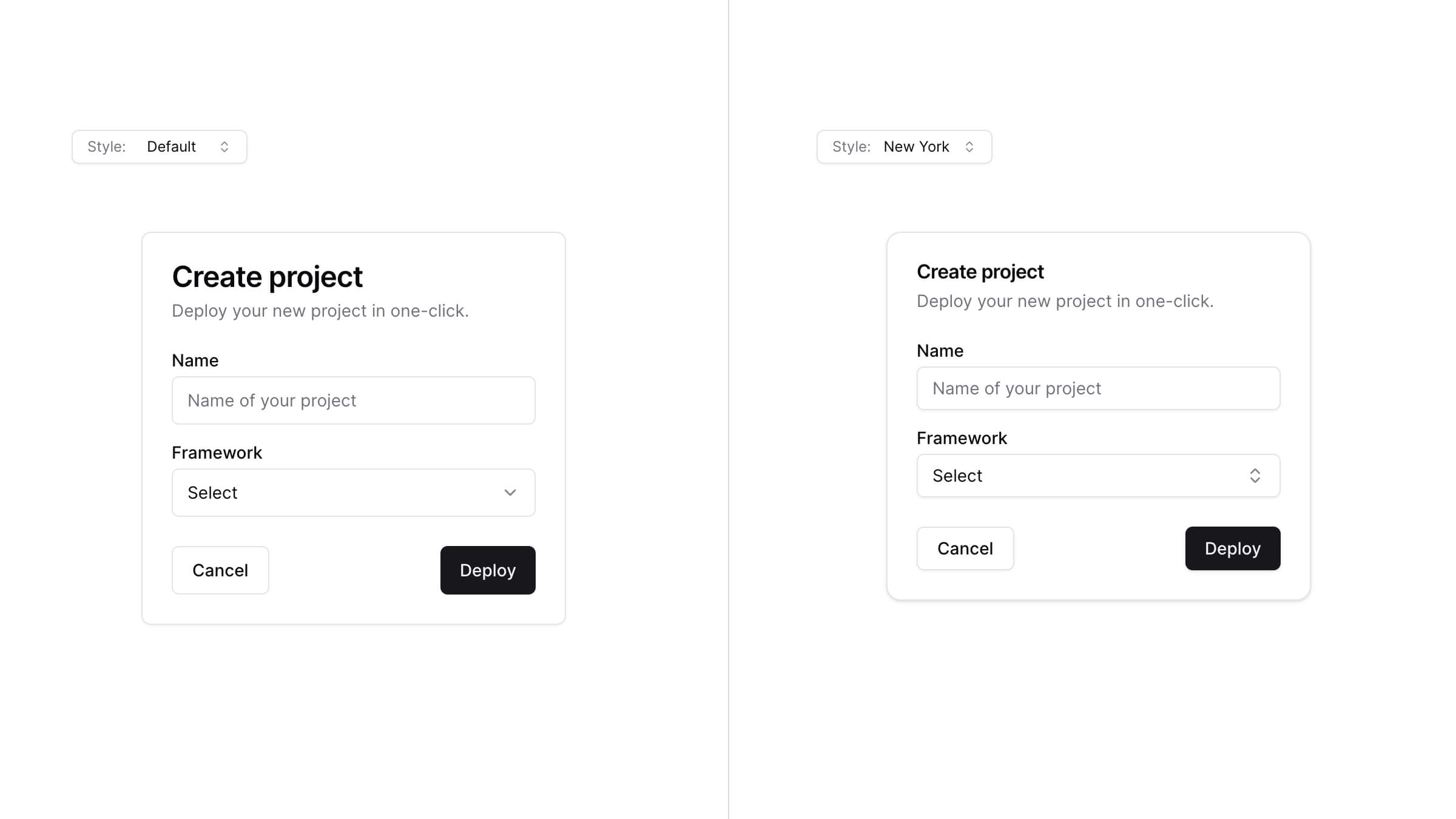
default 风格是你习惯的风格。这是我们从项目开始就一直在使用的风格。它使用 lucide-react 作为图标,tailwindcss-animate 作为动画。
🌐 The default style is the one you are used to. It's the one we've been using since the beginning of this project. It uses lucide-react for icons and tailwindcss-animate for animations.
new-york 风格是一种新风格。它配备了更小的按钮、带阴影的卡片以及来自 Radix Icons 的全新图标集。
🌐 The new-york style is a new style. It ships with smaller buttons, cards with shadows and a new set of icons from Radix Icons.
当你运行 init 命令时,系统会询问你想使用哪种样式。这会保存在你的 components.json 文件中。
🌐 When you run the init command, you will be asked which style you would like to use. This is saved in your components.json file.
{
"style": "new-york"
}主题
🌐 Theming
首先以样式为基础,然后使用 CSS 变量或 Tailwind CSS 实用程序类设置主题,以完全改变组件的外观。
🌐 Start with a style as the base then theme using CSS variables or Tailwind CSS utility classes to completely change the look of your components.

退出动画
🌐 Exit animations
我为所有组件添加了退出动画。点击下面的下拉框以查看细微的退出动画。
🌐 I added exit animations to all components. Click on the combobox below to see the subtle exit animation.
可以使用实用程序类自定义动画。
🌐 The animations can be customized using utility classes.
其他更新
🌐 Other updates
按钮
🌐 Button
- 添加了一个新的按钮尺寸
icon:
工作表
🌐 Sheet
- 将
position重命名为side以匹配其他元素。
- 移除了
size属性。使用className="w-[200px] md:w-[450px]"进行响应式尺寸调整。
更新你的项目
🌐 Updating your project
由于我们遵循复制和粘贴方法,你需要手动更新项目以获取最新更改。
🌐 Since we follow a copy and paste approach, you will need to manually update your project to get the latest changes.
注意:我们正在开发一个diff命令来帮助你跟踪上游更新。
添加 components.json
🌐 Add components.json
在根目录创建一个 components.json 文件:
🌐 Creating a components.json file at the root:
{
"style": "default",
"rsc": true,
"tailwind": {
"config": "tailwind.config.js",
"css": "app/globals.css",
"baseColor": "slate",
"cssVariables": true
},
"aliases": {
"components": "@/components",
"utils": "@/lib/utils"
}
}更新 tailwind.css 和 aliases 的值以匹配你的项目结构。
🌐 Update the values for tailwind.css and aliases to match your project structure.
按钮
🌐 Button
将 icon 尺寸添加到 buttonVariants:
🌐 Add the icon size to the buttonVariants:
const buttonVariants = cva({
variants: {
size: {
default: "h-10 px-4 py-2",
sm: "h-9 rounded-md px-3",
lg: "h-11 rounded-md px-8",
icon: "h-10 w-10",
},
},
})工作表
🌐 Sheet
- 将
sheet.tsx的内容替换为以下内容:
"use client"

import * as React from "react"
import * as SheetPrimitive from "@radix-ui/react-dialog"
import { cva, type VariantProps } from "class-variance-authority"
import { X } from "lucide-react"
import { cn } from "@/lib/utils"
const Sheet = SheetPrimitive.Root
const SheetTrigger = SheetPrimitive.Trigger
const SheetClose = SheetPrimitive.Close
const SheetPortal = ({
className,
...props
}: SheetPrimitive.DialogPortalProps) => (
<SheetPrimitive.Portal className={cn(className)} {...props} />
)
SheetPortal.displayName = SheetPrimitive.Portal.displayName
const SheetOverlay = React.forwardRef<
React.ElementRef<typeof SheetPrimitive.Overlay>,
React.ComponentPropsWithoutRef<typeof SheetPrimitive.Overlay>
>(({ className, ...props }, ref) => (
<SheetPrimitive.Overlay
className={cn(
"fixed inset-0 z-50 bg-background/80 backdrop-blur-sm data-[state=closed]:animate-out data-[state=closed]:fade-out-0 data-[state=open]:animate-in data-[state=open]:fade-in-0",
className
)}
{...props}
ref={ref}
/>
))
SheetOverlay.displayName = SheetPrimitive.Overlay.displayName
const sheetVariants = cva(
"fixed z-50 gap-4 bg-background p-6 shadow-lg transition ease-in-out data-[state=closed]:animate-out data-[state=closed]:duration-300 data-[state=open]:animate-in data-[state=open]:duration-500",
{
variants: {
side: {
top: "inset-x-0 top-0 border-b data-[state=closed]:slide-out-to-top data-[state=open]:slide-in-from-top",
bottom:
"inset-x-0 bottom-0 border-t data-[state=closed]:slide-out-to-bottom data-[state=open]:slide-in-from-bottom",
left: "inset-y-0 left-0 h-full w-3/4 border-r data-[state=closed]:slide-out-to-left data-[state=open]:slide-in-from-left sm:max-w-sm",
right:
"inset-y-0 right-0 h-full w-3/4 border-l data-[state=closed]:slide-out-to-right data-[state=open]:slide-in-from-right sm:max-w-sm",
},
},
defaultVariants: {
side: "right",
},
}
)
interface SheetContentProps
extends React.ComponentPropsWithoutRef<typeof SheetPrimitive.Content>,
VariantProps<typeof sheetVariants> {}
const SheetContent = React.forwardRef<
React.ElementRef<typeof SheetPrimitive.Content>,
SheetContentProps
>(({ side = "right", className, children, ...props }, ref) => (
<SheetPortal>
<SheetOverlay />
<SheetPrimitive.Content
ref={ref}
className={cn(sheetVariants({ side }), className)}
{...props}
>
{children}
<SheetPrimitive.Close className="absolute top-4 right-4 rounded-sm opacity-70 ring-offset-background transition-opacity hover:opacity-100 focus:ring-2 focus:ring-ring focus:ring-offset-2 focus:outline-none disabled:pointer-events-none data-[state=open]:bg-secondary">
<X className="h-4 w-4" />
<span className="sr-only">Close</span>
</SheetPrimitive.Close>
</SheetPrimitive.Content>
</SheetPortal>
))
SheetContent.displayName = SheetPrimitive.Content.displayName
const SheetHeader = ({
className,
...props
}: React.HTMLAttributes<HTMLDivElement>) => (
<div
className={cn(
"flex flex-col space-y-2 text-center sm:text-left",
className
)}
{...props}
/>
)
SheetHeader.displayName = "SheetHeader"
const SheetFooter = ({
className,
...props
}: React.HTMLAttributes<HTMLDivElement>) => (
<div
className={cn(
"flex flex-col-reverse sm:flex-row sm:justify-end sm:space-x-2",
className
)}
{...props}
/>
)
SheetFooter.displayName = "SheetFooter"
const SheetTitle = React.forwardRef<
React.ElementRef<typeof SheetPrimitive.Title>,
React.ComponentPropsWithoutRef<typeof SheetPrimitive.Title>
>(({ className, ...props }, ref) => (
<SheetPrimitive.Title
ref={ref}
className={cn("text-lg font-semibold text-foreground", className)}
{...props}
/>
))
SheetTitle.displayName = SheetPrimitive.Title.displayName
const SheetDescription = React.forwardRef<
React.ElementRef<typeof SheetPrimitive.Description>,
React.ComponentPropsWithoutRef<typeof SheetPrimitive.Description>
>(({ className, ...props }, ref) => (
<SheetPrimitive.Description
ref={ref}
className={cn("text-sm text-muted-foreground", className)}
{...props}
/>
))
SheetDescription.displayName = SheetPrimitive.Description.displayName
export {
Sheet,
SheetTrigger,
SheetClose,
SheetContent,
SheetHeader,
SheetFooter,
SheetTitle,
SheetDescription,
}- 将
position重命名为side
- <Sheet position="right" />
+ <Sheet side="right" />谢谢
🌐 Thank you
我想感谢所有使用这个项目、提供反馈和做出贡献的人。我真的很感激。谢谢大家。
🌐 I'd like to thank everyone who has been using this project, providing feedback and contributing to it. I really appreciate it. Thank you.